


Why professional email signatures are especially important for teachers
Teachers need to maintain a highly professional image. Failing to do so might put a dent in their authority and make them lose the respect of their peers, students, and students’ parents. Importantly, this professional image shouldn’t end at the classroom door. That’s why many teachers use professional email signatures – they’re a simple way to build credibility and trust outside the classroom, too.
Back in the day, signatures were a nuisance few people cared about in most educational organizations. Today, as communication patterns have changed and email has become the primary method of professional communication, they are a must.
So, let’s take a look at a few teacher email signature examples that will ace the test and then go over the ABCs of creating a professional email signature for teachers and professors.
Before you start
Before you start creating your own signature design, keep in mind that many educational organizations, be they schools, colleges, or universities, have their own email signature policies or use dedicated tools to manage their branding. After all, a teacher can be a great brand ambassador, and unified email signatures make a great impression with every email sent. That’s why you should check your organization’s resources to make sure your new perfect email signature doesn’t go against any policy.
Teacher email signature examples
Here are some simple email signature examples and ideas. Each of those signatures is based on a template from our free email signature generator at mail-signatures.com. This means that you can easily transform any of those designs into your new email footer.
Sample teacher email signature 1: Personal Background
Personal Background is a template that works great for teachers who want to fit more elements into their signature. Its vertical layout makes it easy to add extra details for new messages and remove them for replies and forwards – and it looks great in mobile email apps, too.
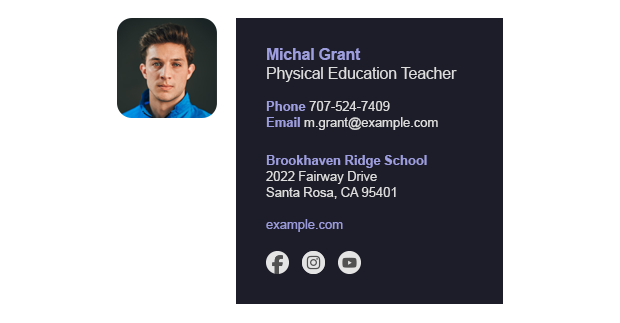
Download or edit this signature in free email signature generator
Teacher email signature example 2: Digital Business Card
Email signatures are your digital business cards. This email signature example is based on a traditional paper business card design, with clear sections that make your contact information super easy to find. You can use your school’s logo instead of your photo or add it under the photo – there’s plenty of space for either option.

Download or edit this signature in free email signature generator
Minimalist teacher email signature 3: After Dark
After Dark may not be the perfect name for a teacher’s email signature (unless you count nighttime exam checks or preparing lesson plans), but the design works great for teachers, anyway. After Dark is a perfect email signature for minimalists – it is compact and contains only the most important elements.

Download or edit this signature in free email signature generator
Didn’t find what you’re looking for? Check out our full email signature template library. All the designs are free to use!
What to include in a teacher’s email signature
Now that you’ve chosen the template and have a general idea of how your signature should look, you need to decide which elements to keep, what to get rid of, and what to add.
Here are some dos and don’ts concerning teacher email signatures.
Dos
- Your name – quite obviously, it’s an indispensable part of an email signature.
- Your job title – or your teaching subject to make it easier to identify you.
- Your up-to-date contact information – what you include here depends on how you prefer people to contact you and what your school’s policies require. But no matter which contact details you choose to share, make sure they are always up to date.
- Email address – there have been long discussions on whether or not an email address should be included in an email signature. The thing is that if your original email is forwarded, your email address might be lost from email headers. Adding it to the email signature can prove to be very useful.
- Your school’s address – adding your school’s name and address might be required by law. Besides, it helps prevent your recipients from accidentally writing to the wrong school.
- Website – if your school has an official website, including a link to it in your email signatures makes it easier for people visit it.
- Your school’s logo – adding it is a great way to strengthen the school’s branding.
- Disclaimer – for some organizations, it’s a must in every email they send. If your school doesn’t have an organization-issued disclaimer, here are some good email disclaimer examples.
Bonus elements you should consider
Now, there are some additional elements that you don’t see in every email signature, but which can be a nice touch for teacher email signatures.
- Office hours – very useful if you want to limit calls after hours. And if you teach at more than one school, simply listing your office hours for each organization can be a game changer for your recipients.
- Social icons – there are two possible ways to use social icons. You can add your social channels, for example, if you have a teaching-themed YouTube channel. Or you can add your school’s official channels. See how to add social media buttons to an email signature
- Your photo – it’s incredible how often your contacts know you but simply cannot put a name to the face. For teachers, it’s more common than you might think. Adding your headshot to email conversations helps you become more recognizable.
- Scheduling link – no matter what online calendar you use, a scheduling link can make it much easier for anyone to make an appointment with you. And for you it’s easier to control your calendar.
- WhatsApp link – some recipients prefer instant messaging apps to email. Such a link can make it easy to move the conversation from email to WhatsApp with a prefilled message of your choice. See how to set it up
Don’ts
- If your school has branding guidelines or email signature policies, don’t go against them.
- Marketing banners – in most cases, marketing banners have no place in a teacher’s email signature. There are a few exceptions, such as school event promotions, but you need to make sure you remove them after the event to keep your signature up to date.
- Custom fonts – while a fancy custom font can look very nice, there’s a good chance that it will not work for most recipients. In email signatures, it’s best to stick to web-safe fonts and use fallback fonts, just in case.
- Using the same signature for new emails and for replies and forwards – an email signature is your digital business card. If you use the same complete design with a long disclaimer at the bottom in every email, it’s like offering your business card to the same person during the same conversation. It’s much better to prepare separate designs for the first email and all the next messages in a conversation.
Learn more about worst email signature mistakes
What is a professional email signature
I’ve been using the “professional email signature” term like a mantra but didn’t actually explain what a professional email signature means. It’s simple, really. A professional email signature must be useful, well-formatted, and look great. In other words, it needs to tick all the following boxes:
- Up-to-date – outdated contact information, an incorrect address, or a 15-year-old photo turn an email signature into a laughingstock.
- HTML format – it might be tempting to create an email signature in Photoshop or Canva and use the generated image as your email signature. It might keep your design safe from formatting changes, but it also makes the signature incompatible with dark mode, prevents links from being clickable, and makes contact details impossible to copy.
- A well-tested design – you need to make sure that your email signature doesn’t break in specific email apps or when forwarding and replying to emails. The easiest way to ensure that is to start with a well-tested signature template.
How to handle email signatures for all school employees
Designing a perfect teacher email signature might take some time, but it is well worth it. It makes communication easier and reinforces your professional image. However, unifying email signatures for all teachers and school employees, and keeping these signatures up to date, might prove to be a Sisyphean effort.
That’s why we’ve created email signature management tools that let you design a single perfect signature template and automatically fill it with up-to-date user details for every school employee. Here are some other ideas of how you can use such a tool:
- Add recipient-specific links to your e-learning platform.
- Schedule email campaigns to promote school events without worrying about anyone forgetting to remove the banner after the event has ended.
- Update your school’s branding for all employees with just a few clicks.
See real-life stories about how email signature management helped schools manage their brand:

See the story about a school that switched from a difficult and unreliable email signature management method to an easy and 100% dependable solution.

See how email signature management helped 450+ employees ensure unified, professional email branding.