
Instead of adding email signatures individually for every user in your company, you can add them automatically for the whole organization. Email platforms such as Exchange Online (Office 365) and Exchange on premises allow admins to create company-wide email signatures via mail flow rules. These native solutions, however, have several limitations, such as:

Best alternative: email signature software
CodeTwo
Email Signatures 365
Centrally managed Microsoft 365 email signatures and legal disclaimers in messages sent from any mail client or device. This revolutionary cloud solution is the only signature management software fully certified by Microsoft. It lets you stay in charge of your company’s email branding without the need of setting anything up on end users’ devices.


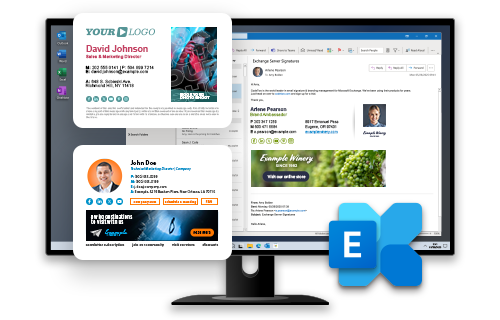


Email signature management tools can help you overcome these limitations and add some extra features, too. With the right signature manager, you can change email signatures used by your company so they are no longer an element that provides basic contact information but instead become a powerful branding and marketing tool.
Why your business needs automated email branding? Top 10 benefits
Company-wide automated email signatures explained in 71 seconds
Centrally managed email signatures – FAQ
Choosing the best email signature tool depends on many factors, like whether you need a personal or a company email signature. In the case of company email signatures, there are additional factors, like the number of mailboxes in your company, the email platform you use, and what you expect to achieve by using professional email signatures. We’ve created a guide to help you choose the right signature tool:
See our guide on choosing the best email signature tool for your needs
Typically, organizations manage their email signatures in one of the two ways:
- Using native methods provided by their email platform, such as Microsoft 365 or Microsoft Exchange Server.
- Using third-party software, such as CodeTwo Email Signatures 365 or CodeTwo Email Signatures On-prem.
Modern third-party tools are often the preferred choice for organizations that want to bypass the limitations of native solutions, optimize the signature management workflow for admins, and let users see their signatures as they type an email.
For very small companies and organizations (below 10 users), using an online tool like our free email signature generator to create a custom email signature will usually do the trick. In this case, you simply choose your favorite design, adjust its contents, and apply the signature in all the users’ email apps. Then, every time you want to change any email signature element, you need to apply the changes for all employees. Contact detail changes need to be managed by users. Since there is no centralized control, users can change their signatures any way they want, but most small-size companies accept this risk (learn more about email signature risks and mistakes).
For larger organizations, a more scalable solution is needed. The greater the size of an organization, the higher the risk of lack of compliance (see email disclaimers for more information) and greater potential benefits of unified branding and marketing. Since native signature tools offered by email platforms (such as Microsoft 365) typically lack a visual signature template editor and have a limited range of features, IT and Marketing teams frequently turn to third-party email signature software to create their custom email signatures and manage them centrally.
With tools like CodeTwo Email Signatures 365, you can create a custom email signature for the entire company using a built-in template library and an easy-to-use editor. You can apply a single template for all users at once – their data will be automatically pulled from your company’s user directory. You can also create multiple templates and apply them dynamically according to various conditions and exceptions.
The answer depends on your organization’s needs, but a professional email signature typically includes at least some of the following elements:
- Full name
- User photo
- Job title
- Phone number(s)
- Office address
- Legal disclaimer
- Social media icons
- Marketing banner
- One-click customer satisfaction survey
- Upcoming out-of-office date
Learn more about the most common email signature elements
With a professional email signature management solution like CodeTwo Email Signatures 365, you can easily add all these elements (and many more) to all of your company email signatures. This way, you’ll ensure consistent user information, branding, and legal disclaimers across your entire organization.
To fetch variable employee data from a user directory and insert it into your company email signature, you need to use placeholders that refer to specific information in that directory, for example, {First name} and {Last name}. While such placeholders are not supported by our signature generator (because it’s not integrated with any user directory), most email signature management tools support them out of the box.
See this quick video to see how placeholders work:
In tools such as CodeTwo Email Signatures 365, you can add multiple placeholders to your signature template using a visual template editor. Using CodeTwo, you can also:
- modify your placeholders’ properties,
- insert rule-based conditional placeholders,
- automatically remove empty spaces from the final signature if a placeholder cannot be replaced with information.
By default, CodeTwo Email Signatures 365 pulls user data from Microsoft Entra ID, but integrations with other user directories, such as Okta or Workday, are also possible, making it a versatile tool for managing professional email signatures.
The easiest option to add different banners or other visual elements to email signatures across different departments is to use an email signature manager like CodeTwo Email Signatures 365 or CodeTwo Email Signatures On-prem, depending on your environment.
Using such tools allows you to create separate rules that add different signature versions depending on the sender’s group (team) or other properties. What’s more, they give you the flexibility to customize and manage your signature versions to suit your organization’s needs:
- Team-specific signature templates can have different banners, or an entirely different layout, depending on what visual elements they need.
- You can also add alternating banners in a single template and automatically rotate them every now and then to better promote your ongoing campaigns or incoming events.
- The built-in scheduler lets you set up your email signature campaigns, for example, well before a product launch. This way, you can rest assured that everything will be ready when the right time comes.
Setting up company-wide email signatures using built-in tools offered by Microsoft 365 and other email platforms usually takes anywhere from a few hours to a few days. While creating rules for adding signatures is generally straightforward, the limitations of native tools often make the signature design and testing stages much more time-consuming. Without a visual signature template editor or a dynamic rule tester, the process can become cumbersome, especially in larger organizations, and often requires a good understanding of HTML.
Fortunately, email signature management tools like CodeTwo Email Signatures 365 or CodeTwo Email Signatures On-prem can speed up the process and make it much easier. Using these tools, you can roll out email signatures across the entire company in just a few minutes, regardless of the company’s size.
With CodeTwo, you can set everything up in just a few clicks using an intuitive interface and design your signature templates in a WYSIWYG editor. Thanks to the built-in rule testers and signature previews, you can also make sure that everyone gets the correct signature, complete with up-to-date information pulled from your organization’s user directory. Once everything is ready, you can go live with your signatures across the company.
Yes, you don’t need to write a single line of code to centrally manage company-wide email signatures. What’s more, if you use a solution like CodeTwo Email Signatures 365, you don’t even need to know anything about HTML to design professional signature templates and roll them out across the entire company.
In fact, CodeTwo makes it easy to delegate email signature tasks to non-IT staff, such as your Marketing team. This allows marketers to create and update signature designs and branding, while IT retains control over the technical aspects and overall configuration (still, without writing a single line of code).
Absolutely – and it’s proven by the thousands of companies that rely on email signature management solutions to:
- stay compliant with legal regulations and industry requirements,
- turn every email into a marketing opportunity,
- ensure contact details are always accurate and up to date,
- build trust with customers and business partners,
- boost brand visibility and reputation,
- and much more.
Join over 140,000 companies that trust CodeTwo to centrally manage their email signatures and transform every signature into a powerful asset. Learn more at www.codetwo.com.